
Today dashboard
Today is the place where the training day comes together. It helps athletes, parents, and coaches see what is planned, what has already been done, and what still needs attention — all in one clear daily view.
Whether you are getting ready for practice, checking what comes next, or making sure the day stays on track, Today gives you one simple place to work from. Instead of jumping between different parts of the app, you can manage the day from a single screen and stay focused on what matters most. For how the main areas fit together, see the Interface overview.
Why Today matters
Training days can become busy very quickly. Sessions, recovery, meals, reminders, and follow-ups all compete for attention. Today helps turn that complexity into a readable plan.
For athletes, it creates more clarity and routine. You can see your day, understand what is coming next, and stay more consistent with the work you need to complete.
For parents, it makes the process more visible. Instead of only seeing outcomes from the outside, you can better understand how the day is structured and what the athlete is expected to do.
For coaches, it supports better organization and follow-through. Today helps connect planning with execution, so day-to-day work does not get lost and longer-term development stays on track. For platform context, see About CoachEye.
What you can do in Today
Use Today to:
- review the current training day at a glance;
- switch between Today and Calendar views;
- follow scheduled items such as sessions, meals, tasks, and follow-ups;
- set reminders on supported rows;
- add a new session when needed;
- schedule a match when you want Match Play with location, participants, and an optional training plan;
- schedule a training session when the day’s block should be built around drills and hub content (Tennis + Add Training Plan or Routine);
- move from daily execution into broader planning and review flows — for example Development Plans and Logbook.
This makes Today more than a simple daily screen. It acts as the operational center for what needs to happen now, while still keeping that work connected to the bigger training process.
How Today is organized
Today is opened from the bottom navigation through To-Do. At the top of the screen, you can switch between:
- Today — for a focused view of the current day
- Calendar — for a wider weekly planning view
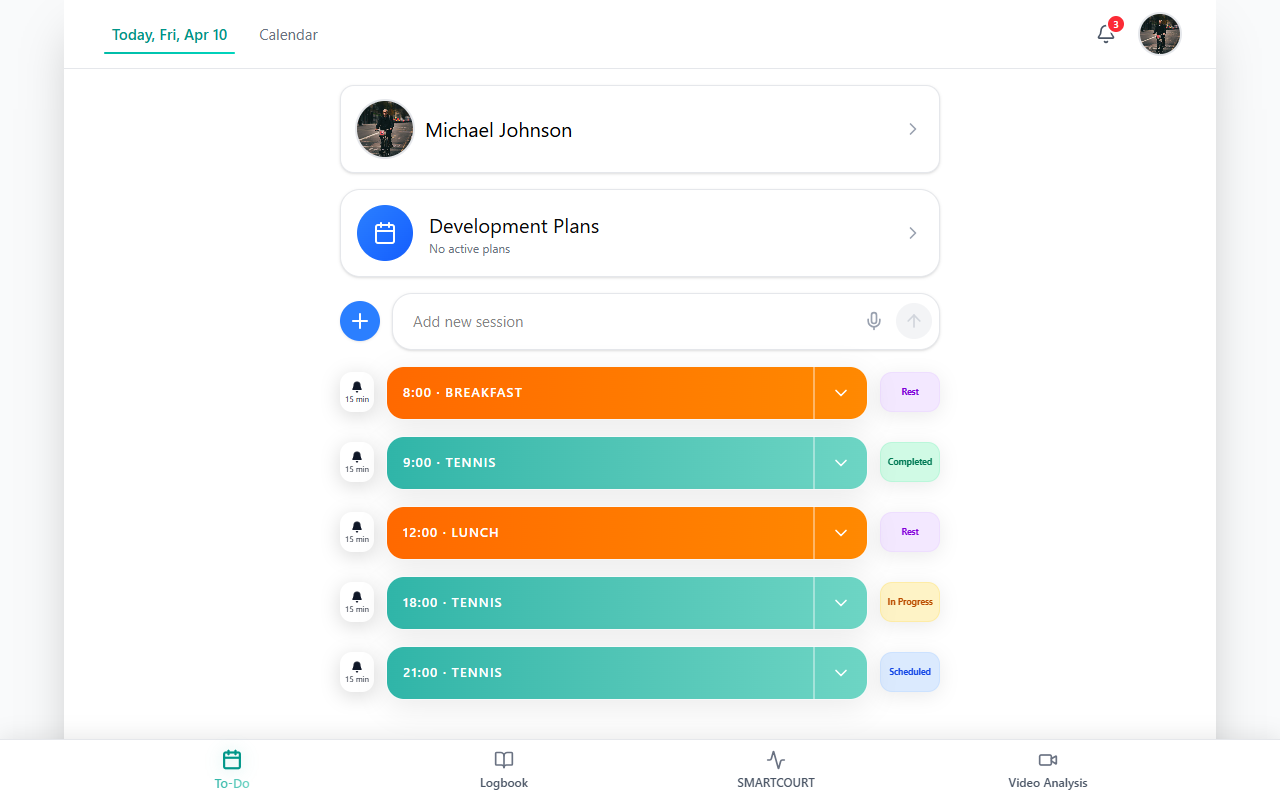
Figure: open the To Do area from the footer before using the header tabs or timeline.
The main area gives you a readable summary of the day and a scrollable timeline of training-related items. Depending on your setup, this can include sessions, meals, tasks, follow-ups, and other planning entries.
This layout helps you stay grounded in the present day while still keeping the wider week in sight.
Using the Today view
The Today tab is designed for day-to-day execution. It helps you see what is scheduled, what has already happened, and what still needs attention.
This is especially useful on packed training days, when it is easy to lose track of the next session, forget a follow-up, or miss a small but important task. With everything visible in one place, the day becomes easier to manage and easier to follow through on.
Use this view when you want to:
- prepare for practice;
- review what is coming next;
- keep the day organized;
- make quick updates without leaving the screen.
Using the Calendar view
The Calendar tab gives you a broader planning view of the week.
Use it when you want to step back from the current day and understand the bigger schedule: how sessions are distributed, what is coming up next, and how the week is taking shape. This is especially helpful when balancing training, recovery, and other responsibilities.
Calendar works well together with Today:
- Today helps you manage what is happening now.
- Calendar helps you see what is coming next.
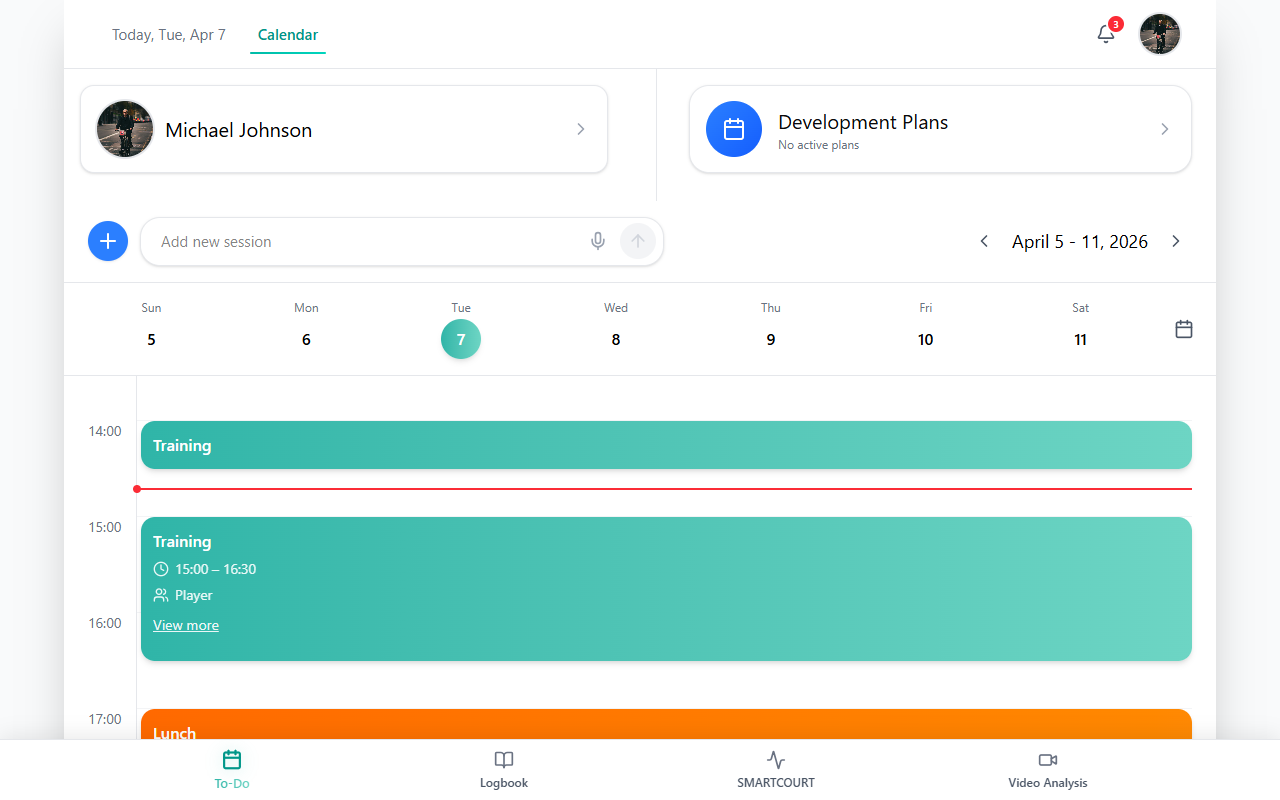
Figure: Calendar — week-oriented planning.
For schedule- and history-focused help, see Logbook and Usage scenarios.
Reminders
On rows that support reminders, tap the bell icon to open the reminder options. From there, you can choose a lead time or clear the reminder.
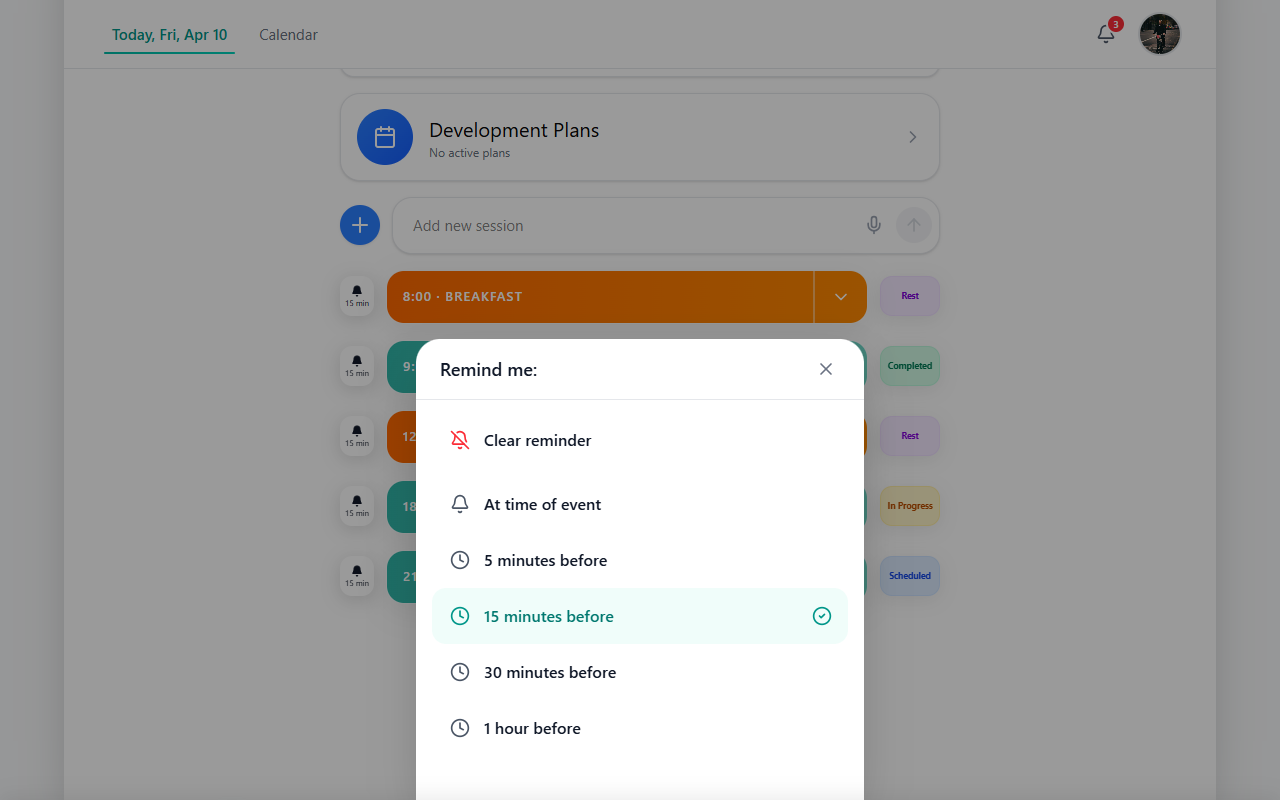
Figure: reminder sheet for a supported row.
Reminders are especially useful on busy training days. They help athletes stay on schedule, reduce missed actions, and support a more disciplined routine. If reminder timing does not look right, check your app notification settings.
How Today supports the bigger training process
Today is not just a daily checklist. It is part of a larger development flow inside CoachEye (see About CoachEye).
It helps turn daily execution into something more structured and meaningful:
- today’s sessions feed into longer-term review — see Logbook;
- daily consistency supports real progress;
- reminders and follow-ups make plans easier to complete;
- visible structure helps athletes, coaches, and parents stay aligned.
In other words, Today helps make training more manageable in the moment — and more valuable over time. For weekly planning depth, open Development Plans.
Tips
- Start from To-Do, stay on Today, scan status once down the list, then switch to Calendar if you need the week.
- Use Today for hour-by-hour execution; use Calendar for week context and multi-day planning.
- If tapping a row does not open a session, try expanding the row or opening the session from Logbook after it appears there—behavior can vary by row type.
- Scheduled items can include tasks, follow-ups, and training-related entries; the mix of manual entries and suggestions can vary.
Related guides
If you want to go further from Today, these guides are the most useful next steps:
- Add a session from Today — create a new session and choose the right session type
- Schedule a match — Match Play sessions: court, participants, optional training plan
- Schedule a Training Session — filling the day with drills via Training Hub, templates, and routines
- Development Plans — connect daily work to longer-term planning
- Logbook — review training history and deeper progress views
- Training Hub — work with drills, routines, and training content
- Smart Court — support on-court workflows
- Video Analysis — review and analyze performance
- Usage scenarios — see how planning, training, and review work together
- Interface overview — understand how Today fits into the rest of the app
- Quick start — first-time orientation